7 Best Morning Routine Apps for Kids in 2026

The best morning routine apps for kids do more than display a checklist. They help a child understand what comes next, begin without repeated prompting, and move through the routine at a realistic pace.
Different apps solve different morning problems. A visual timer may help a young child understand time. A reward system may motivate a reluctant starter. A shared family app may work better when several children have recurring responsibilities. This guide compares seven strong options so you can choose for your child's age, needs, devices, and household.
Pricing and availability were checked in September 2026. App prices and features can change, and regional storefront pricing may differ.
Best morning routine apps at a glance
App | Best for | Platforms | Starting price |
|---|---|---|---|
Xtra Hands | Whole-family routines, chores, and rewards | iOS and Android | First member free with every feature |
Brili Routines | Guided, timed routines and transitions | iOS and Android | 10-day trial; listed from $7.99 monthly |
Happy Kids Timer | Simple animated routines for younger children | iOS and Android | Free; optional upgrade varies by store |
Joon | Game-based motivation for ages 6-12 | Primarily iOS family setup | Free tier; premium from $12.99 monthly |
Routinery | Step-by-step routines with a timer | iOS and Android | Two routines free; listed from $5 monthly |
Choiceworks | Custom visual schedules and transition support | Apple devices | $39.99 one-time purchase |
Skylight Calendar | A shared routine display for the whole household | Dedicated display and mobile app | Hardware from $169.99; core routines included |
How we compared morning routine apps
A morning app needs to work during the busiest part of the day. We compared each option using the features that affect real family use:
Child clarity: Can a child tell what to do now and what comes next?
Routine support: Can steps repeat on the correct days without being rebuilt?
Time support: Does the app use timers, pacing, or visual time cues?
Motivation: Are rewards, progress, games, or positive feedback available?
Parent control: Can an adult create routines, review work, and adjust expectations?
Family fit: Does it work for multiple children, caregivers, and devices?
Cost: Is the useful experience free, a one-time purchase, a subscription, or tied to hardware?
We used current vendor pages, support documentation, and official app-store listings. We did not rank apps by who offers the most features. The best choice is the one that addresses your family's actual morning bottleneck.
1. Xtra Hands: best for whole-family routines and rewards
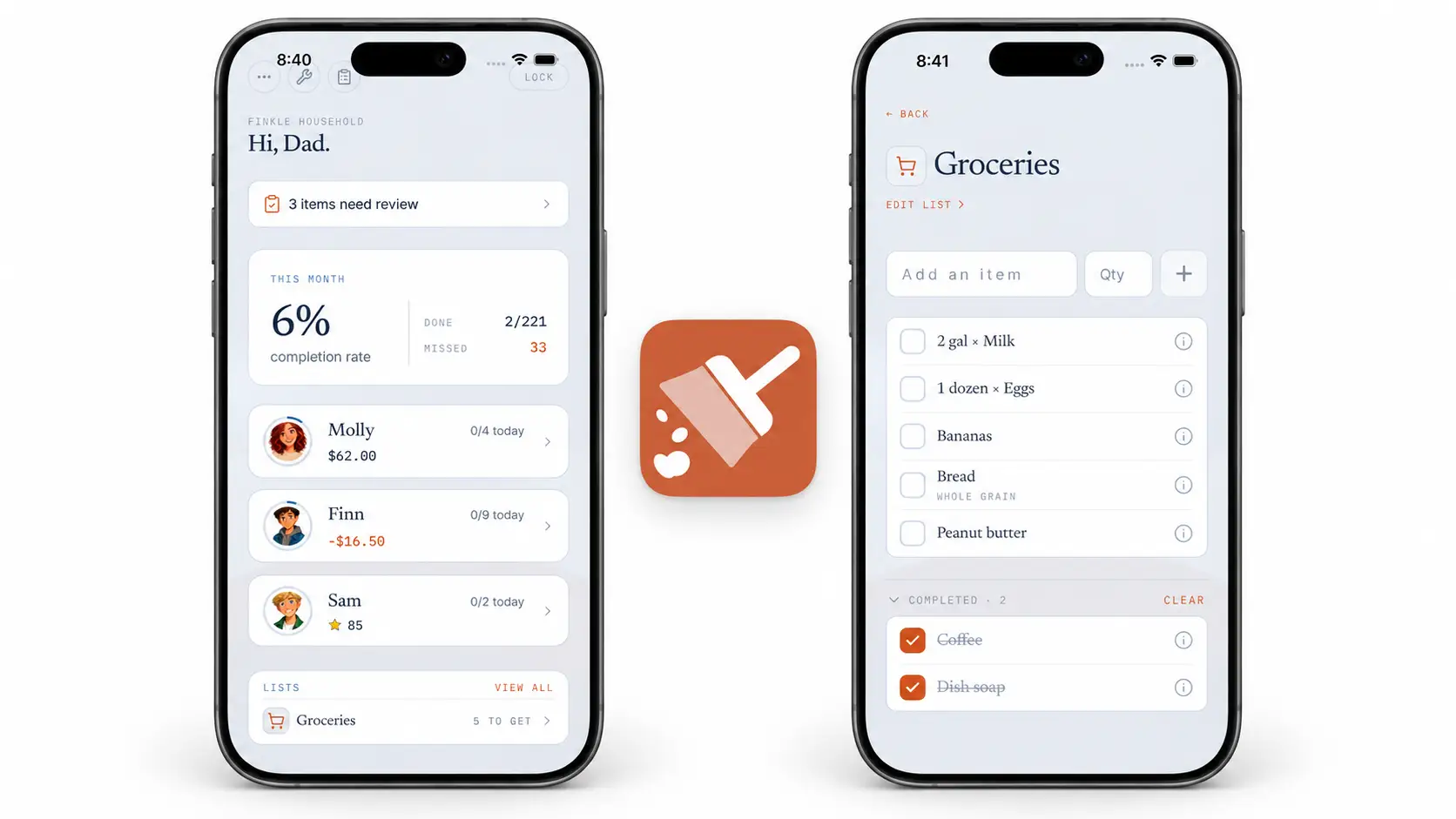
Xtra Hands works well when the morning routine is part of a larger family responsibility system. Parents can create recurring steps such as getting dressed, making the bed, eating breakfast, brushing teeth, and packing a backpack. Those tasks can live alongside household chores, one-time jobs, and after-school responsibilities.
Families can use money, stars, custom rewards, or no reward at all. Parent approval and optional photo proof are useful when selected tasks need verification, although most basic morning habits will not need either.
What stands out
Recurring and one-time responsibilities in one system.
Money, stars, and custom family rewards.
Parent approval and optional photo proof.
Shared household history and progress.
Mixed-device family support across iOS and Android.
No feature restrictions for the free first member.
Limitations
Xtra Hands is a family chore and responsibility app rather than a dedicated visual countdown timer. If your child needs every routine step paced automatically with a large visual clock, Brili, Happy Kids Timer, or Routinery may be a closer match.
Pricing
The first member is free with every feature and no trial deadline. Additional household members start at $1.99 per month, with the Crew plan covering five or more members for $7.99 per month. Annual plans are approximately 30% less than paying monthly.
Best fit: Families who want morning routines, chores, approvals, and rewards in one cross-platform household system.
2. Brili Routines: best for guided timing and transitions
Brili presents a routine as a sequence of focused task cards with a dynamic timekeeper. It is designed to guide the user through what is happening now, how long remains, and what comes next. That makes it especially relevant for children who lose track of time or struggle to transition between morning steps.
Its official listing includes routine creation, a visual clock, notifications, achievements, customizable rewards, routine history, and a weekly calendar. Brili also provides prebuilt routine templates.
What stands out
Strong visual pacing for each routine.
Clear one-step-at-a-time presentation.
Templates for morning, bedtime, study, cleaning, and other routines.
Custom rewards and achievements.
Available on iOS and Android.
Limitations
Brili is subscription-based after the trial. Its strongest value is guided routine execution rather than allowance, paid jobs, or a broad family chore economy.
Pricing
Brili offers a 10-day free trial. Its US App Store listing showed $7.99 monthly, $34.99 for six months, and $49.99 yearly, with other purchase options and regional variation possible. Confirm the current offer in your app store.
Best fit: Children who benefit from visual time, active pacing, and help moving from one step to the next.
3. Happy Kids Timer: best simple option for younger children
Happy Kids Timer turns a preset morning or bedtime routine into a child-operated sequence with animation, music, a countdown, stars, and rewards. The standard morning routine covers common jobs such as making the bed, brushing teeth, getting dressed, eating breakfast, packing lunch, packing a bag, and putting on shoes.
The app is intentionally narrower than a family organizer. A child carries the device through a familiar sequence, while the premium upgrade lets parents customize chores, order, timing, and rewards.
What stands out
Simple visual flow for preschool and early elementary ages.
Built-in morning and bedtime sequences.
Animated tasks, countdowns, stars, and reward goals.
Option to remove the countdown for children who find it stressful.
Free preset experience.
Limitations
The current support documentation says the morning version is designed for one child. Customization requires the paid upgrade, and the experience is less suited to managing a household with several members and rotating responsibilities.
Pricing
The core app is free. The US iOS listing showed a $3.99 feature unlock, while the developer notes that pricing appears in local currency inside the app.
Best fit: Younger children who need an engaging, ready-made morning sequence rather than a complex family system.
4. Joon: best game-based motivation for ages 6-12
Joon turns assigned tasks into quests that help a child care for and develop a virtual pet. Parents create responsibilities, children mark quests complete, and approved work earns in-game coins and experience.
The product is explicitly positioned for ages 6-12 and for families supporting children with ADHD, autism, ODD, anxiety, or other behavioral and executive-function challenges. Morning steps such as brushing teeth, getting dressed, and preparing for school can become quests alongside chores, homework, and movement.
What stands out
Deep game loop built around a virtual pet.
Parent review and approval of completed tasks.
Reminders and recommended activities.
Multiple adults and children under one subscription.
Free version available without entering a credit card.
Limitations
The game is the central motivator, which will be a strength for some families and too much screen emphasis for others. Joon's current documentation also indicates that parent setup remains iOS-centric, so Android-only parents should confirm current support before subscribing.
Pricing
The free version allows up to seven quest verifications per day. Joon lists premium at $12.99 monthly or starting at $89.99 annually after a seven-day trial.
Best fit: Children ages 6-12 who are strongly motivated by games and virtual-pet progress.
5. Routinery: best for step-by-step personal routines
Routinery is a routine runner rather than a child-specific chore app. It organizes steps in order, gives each one a duration, and moves the user through the sequence with a timer. A morning routine can show exactly what is happening, how long it should take, and the expected finish time.
It can work well for an older child, teen, or parent who wants direct pacing without a separate reward economy.
What stands out
Ordered routine steps with a timer for each.
Recurring schedules by day and time.
Routine history and calendar widgets.
Useful for morning, evening, study, self-care, and adult routines.
Available on iOS and Android.
Limitations
Routinery is designed as a personal productivity tool, not a parent-and-child responsibility system. It does not center parent approval, sibling chore rotation, or household allowance.
Pricing
The free version supports two routines. The developer listed US pricing at $5 monthly or $36 yearly, while its App Store listing showed several current and legacy purchase options. Check the in-app offer for the exact price.
Best fit: Older children and teens who need an ordered, timed sequence and can operate the routine more independently.
6. Choiceworks: best customizable visual-support app
Choiceworks is built around visual boards rather than points or chores alone. Schedule boards show what is happening now and what comes next. Waiting boards, feelings boards, visual timers, custom pictures, video, text, and recorded audio make it adaptable for children who benefit from strong visual communication.
Parents, caregivers, educators, and therapists can create multiple profiles and customize boards for home, school, appointments, or travel.
What stands out
Highly customizable visual schedules.
Custom photos, text, video, and recorded audio.
Visual timers and support for transitions and waiting.
Multiple profiles.
No ads, tracking, or accounts according to its App Store listing.
Limitations
Choiceworks is an Apple-platform product and does not provide the same cross-platform household participation as Xtra Hands. It is a visual-support toolkit rather than an allowance or family chore manager.
Pricing
The US App Store listed Choiceworks at a $39.99 one-time purchase.
Best fit: Families who need deeply customizable visual schedules, transition support, and personal media.
7. Skylight Calendar: best shared wall display
Skylight Calendar takes a different approach: the routine lives on a dedicated household touchscreen rather than only on a child's phone. Each family member can have a profile, and routines repeat by time of day with visible progress.
The display can combine routines with the family calendar, chores, lists, and meal planning. Parents can also manage information from the mobile app.
What stands out
Large, glanceable display in a shared location.
Profiles for multiple family members.
Day and week task views.
Calendar, routines, chores, and lists in one device.
Core chores and routines do not require a subscription.
Limitations
Skylight requires dedicated hardware, making it much more expensive to start than an app. Rewards and several advanced features require Skylight Plus. It is best for families who specifically want a visible home command center.
Pricing
At the time of review, Skylight listed its 10-inch Calendar at $169.99, Calendar 2 at $299.99, and Calendar Max at $599.99. Core calendar, list, chore, and routine features are included without Plus.
Best fit: Families who want routines and schedules visible on a shared wall or counter display.
Which morning routine app should you choose?
Choose Xtra Hands for cross-platform family routines, chores, rewards, and approvals.
Choose Brili when time blindness and transitions are the main problem.
Choose Happy Kids Timer for a simple preset routine for one younger child.
Choose Joon when a child ages 6-12 responds strongly to video-game motivation.
Choose Routinery for an older child who wants a personal timed routine runner.
Choose Choiceworks for custom visual communication and transition support on Apple devices.
Choose Skylight when the family wants a dedicated shared display and can justify the hardware cost.
What to put in a child's morning routine
The app cannot rescue an overloaded routine. Start with the essential sequence:
Use the bathroom.
Get dressed.
Make or straighten the bed.
Eat breakfast.
Brush teeth and hair.
Pack lunch, water, and school materials.
Put on shoes and outerwear.
Check the departure area.
Use fewer steps for younger children and break vague jobs into visible actions. Prepare anything possible the night before. A morning app should externalize the sequence, not squeeze more work into an already rushed hour.
How to introduce a morning routine app
Build the routine with your child. Agree on the essential steps and their order.
Practice outside a rushed morning. Learn the controls on an afternoon or weekend.
Start with one routine. Do not add morning, bedtime, homework, chores, and rewards all at once.
Keep adult support at first. The app is a cue, not an instant replacement for teaching.
Review after one week. Adjust time estimates, order, notifications, and unnecessary steps.
For help building the underlying schedule, see How to Create a Weekly Chore Schedule for Kids. If repeated verbal prompting is the larger issue, read How to Get Kids to Do Chores Without Nagging.
Frequently asked questions
What is the best free morning routine app for kids?
Xtra Hands gives the first member every feature free with no trial deadline. Happy Kids Timer offers a free preset routine, Routinery allows two free routines, and Joon has a free tier with a daily verification limit. The best choice depends on whether you need family sharing, visual timing, or game-based motivation.
What is the best morning routine app for a child with ADHD?
Brili is strong for visual pacing and transitions, Joon for game-based motivation, Choiceworks for customizable visual supports, and Xtra Hands for recurring responsibilities and rewards. Different children respond to different cues, so test the workflow rather than choosing from the label alone.
Does my child need a phone?
No. Younger children can use a shared tablet or a parent's device. Skylight uses a dedicated household display. The important question is whether the routine remains visible and accessible when the child needs it.
Should a morning routine use rewards?
Rewards can help a child begin or establish a new sequence, but they are not required. Visible progress, independence, less rushing, and arriving on time may become sufficient reinforcement. If you use rewards, define the goal clearly and review it as the habit develops.
Can an app replace parent reminders?
An app can replace many repeated verbal prompts after the routine is taught. It cannot replace clear expectations, practice, realistic timing, or calm follow-through. Introduce it as a shared support rather than handing over a device and expecting instant independence.
Final verdict
Choose the app that fits the problem you are actually trying to solve. Visual timers help with pacing. Guided sequences help with transitions. Games can unlock motivation. Shared family systems keep recurring work and rewards organized across people and devices.
For families who want morning tasks to connect naturally with chores, stars, allowance, custom rewards, and the rest of household life, start free with Xtra Hands.