6 Best Allowance Apps for Kids in 2026

The best allowance apps for kids fall into two different categories. Some track chores, earnings, stars, and family-managed balances. Others are financial products that hold real money and issue a prepaid debit card. Choosing the wrong category can mean paying for banking features you do not need or missing the spending tools you expected.
This guide compares six strong allowance apps in 2026, including their approach to chores, real-money movement, saving, platforms, and current pricing. The right choice depends on whether your priority is household responsibility, hands-on spending, or both.
Features and US pricing were checked in September 2026. Financial-product terms and app prices can change, so review the provider's current disclosures before opening an account.
Best allowance apps at a glance
App | Best for | Real money or tracked balance? | Starting price |
|---|---|---|---|
Xtra Hands | Chores, allowance, stars, and custom rewards | Family-tracked balance | First member free |
Greenlight | Full-featured kids debit card and parental controls | Real money and prepaid cards | $5.99 per family monthly |
BusyKid | Chore-based payday with spend, save, share, and invest | Real money and prepaid cards | $48 annually |
Acorns Early | Financial education and a card for ages 6-18 | Real money and prepaid cards | From $8 monthly after trial |
FamZoo | Highly customizable family finance rules | Prepaid cards, IOU balances, or both | $5.99 monthly |
Homey | Simple chores, allowance, rewards, and goals | Tracked balance with optional financial features | Free for up to three accounts |
Tracked allowance vs. real-money allowance
Before comparing features, decide what you want the app to do with money.
Tracked-balance apps
A tracked balance records what a parent owes a child. The app does not need to hold the funds or issue a card. When the child spends money, the parent pays and subtracts it from the balance, provides cash, or handles the purchase another way.
This approach works well when:
The child is too young for a debit card.
The family mainly needs chore and reward organization.
Parents want money, stars, and non-cash rewards together.
The family does not want another financial account or banking subscription.
Real-money and debit-card apps
These products transfer actual money into a child account or prepaid card. They can support store purchases, savings buckets, transaction alerts, and spending controls.
This approach works well when:
The child is ready to make supervised purchases.
Parents want automatic transfers and transaction records.
A teen needs a payment card for increasing independence.
Financial education is the main goal.
Neither model is inherently better. The difference is whether the app organizes the family agreement or becomes part of the family's financial infrastructure.
How we compared allowance apps
We reviewed each product using criteria that matter after the first week:
Chore assignment and recurrence.
Parent approval or completion review.
Automatic versus manual allowance.
Saving, spending, giving, and reward options.
Debit-card availability and parental controls.
Support for several children and caregivers.
Platform availability.
Subscription and family pricing.
Information came from official product pages, support documentation, app-store listings, and financial fee disclosures.
1. Xtra Hands: best for chores and flexible family rewards
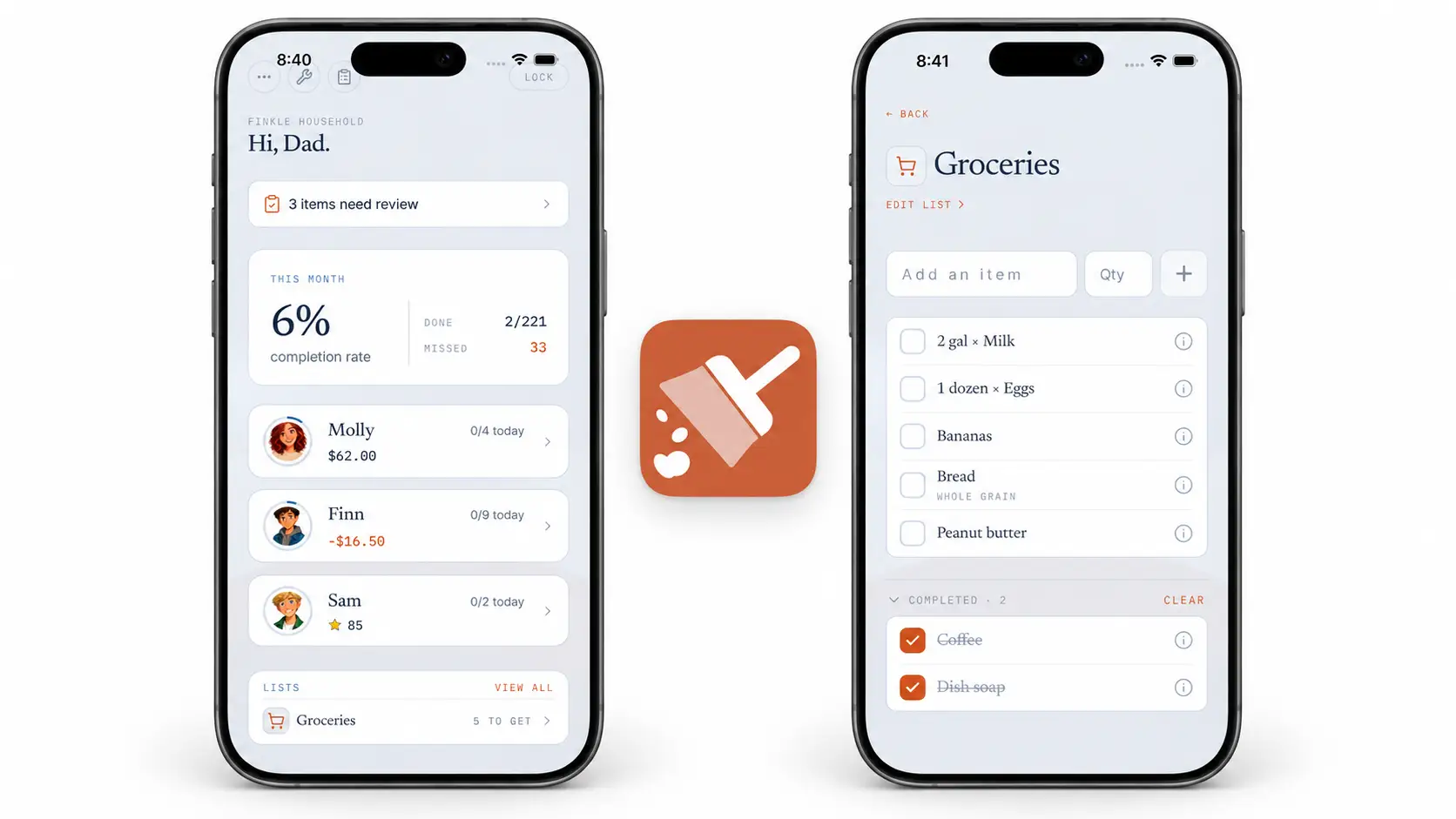
Xtra Hands is a chore and reward system rather than a bank account. Parents can assign expected responsibilities, paid jobs, or tasks worth stars. Children build a family-managed balance and can redeem custom rewards without needing a prepaid card.
This separation is useful for families who want to teach earning and saving before opening another financial account. It also lets non-cash rewards and unpaid responsibilities live beside allowance.
What stands out
Money, stars, custom rewards, and unpaid chores in one household.
Recurring, rotating, and one-time assignments.
Parent approval and optional photo proof.
Clear completion and balance history.
Mixed-device support across iOS and Android.
Every feature included for the first free member.
Limitations
Xtra Hands tracks what a child has earned but does not issue a debit card or automatically transfer money into a bank account. Parents remain responsible for redeeming or paying the balance.
Pricing
The first member is free with all features and no trial deadline. Additional members start at $1.99 monthly. Crew supports five or more members for $7.99 monthly, and annual plans are approximately 30% less.
Best fit: Families that want chores, allowance, stars, and custom rewards without opening a child financial account.
2. Greenlight: best full-featured kids debit card
Greenlight combines chores and allowance with prepaid debit cards, savings, spending controls, educational tools, and optional investing or family-safety features on higher plans.
Parents can send money and manage cards for up to five children. The core plan includes chore and allowance tools, while more expensive tiers add higher savings rewards, investing features, cash back, and other services.
What stands out
Debit cards for up to five kids on one family plan.
Chore and allowance management.
Store- and category-level spending controls.
Real-time spending visibility.
Savings and financial-literacy tools.
Optional investing and family-safety features.
Limitations
Greenlight requires an ongoing family subscription, even if you only need basic chore and allowance tracking. Its broad financial feature set may be more product than a younger child needs.
Pricing
Official September 2026 pricing listed Core at $5.99 monthly, Max at $10.98, Infinity at $15.98, and Family Shield at $19.98. Plans include cards for up to five children; terms and additional fees should be reviewed in Greenlight's current disclosures.
Best fit: Families ready for real-money transfers, child debit cards, and detailed parental spending controls.
3. BusyKid: best for a chore-driven weekly payday
BusyKid centers its system on chores and payday. Children complete assigned work, a parent reviews the weekly payday, and approved earnings move into spending, saving, and sharing categories. Families can also enable automatic allowance without tying every payment to chores.
The app includes prepaid cards, charitable giving, and investing features, making it a bridge between household responsibility and hands-on money management.
What stands out
Preloaded chores and suggested values based on age.
Parent-approved Friday payday.
Custom split among save, share, and spend.
Optional automatic allowance.
Prepaid card and investing options.
Activity feed covering chores and money movement.
Limitations
The structured payday model fits families that want allowance closely connected to chores. Families that intentionally separate allowance from expected contribution may need to rely more on Auto-Allowance or customize the default workflow.
Pricing
BusyKid listed its family subscription at $48 billed annually. Review the cardholder agreement for any card-related fees and current terms.
Best fit: Families who want completed chores to flow into a predictable real-money payday.
4. Acorns Early: best for guided financial education
Acorns Early is the current US evolution of GoHenry. It offers prepaid debit cards for children ages 6-18, allowance and paid tasks, parent controls, savings goals, gifting, and interactive financial lessons.
Its Money Missions use videos, quizzes, points, and badges to teach money topics alongside the child's real spending experience.
What stands out
Prepaid card for ages 6-18.
Automatic allowance and paid tasks.
Parent and child app experiences.
Spending limits, card lock, and transaction notifications.
Savings goals and family gifting links.
Financial-learning missions.
Limitations
This is a paid financial product rather than a general family chore tracker. It is designed for children ready to handle real money and a card, not toddlers or families focused mainly on non-cash rewards.
Pricing
Acorns listed a one-month free trial followed by plans starting at $8 monthly. Because the product has transitioned from GoHenry and plan structures can change, confirm current family limits and pricing during signup.
Best fit: Children ages 6-18 who are ready for a prepaid card plus structured financial education.
5. FamZoo: best for customizable family finance rules
FamZoo offers both prepaid-card accounts that hold real money and IOU accounts that track money held elsewhere by parents. Families can use either model or combine them.
Its system goes beyond basic allowance with automated payments, chore charts, split deposits, savings goals, parent-paid interest, family loans, budgets, reimbursements, penalties, and shared expenses.
What stands out
Choice of prepaid cards, IOU balances, or both.
Unlimited family members under one subscription price.
Automated allowance and chore payments.
Custom spending, saving, and giving subaccounts.
Parent-paid interest, matching, loans, and family billing.
Access through iOS, Android, web browsers, and text messaging.
Limitations
FamZoo's flexibility creates a steeper setup and learning curve than a simple allowance tracker. Families wanting a highly visual child chore experience may find it finance-heavy.
Pricing
FamZoo listed $5.99 per family monthly after a one-month trial. Prepaying $59.90 covered twelve months plus an extra free month, an effective rate of $4.99 per month. Card-related exceptions and fees are detailed in its documentation.
Best fit: Families that want detailed control over a private family finance system and may use both tracked IOUs and prepaid cards.
6. Homey: best simple free start for a small family
Homey combines chores, allowance, rewards, goals, and notifications. Its basic version is free for families using up to three accounts, making it approachable for a parent and one or two children.
The app focuses on replacing paper charts and sticky notes with shared assignments and progress. Premium options expand the household and add features.
What stands out
Chores, allowance, rewards, and smart notifications.
Free basic use for up to three accounts.
Multiple devices can connect to the household.
Available on iOS and Android.
Designed around family task organization.
Limitations
Families larger than three accounts need a subscription. Its product and pricing information appears across the developer site and app stores, so confirm which banking or money-transfer features are available in your region and plan.
Pricing
Basic use is free for up to three accounts. The US App Store listed several current and legacy purchases, including a $6.99 monthly and $59.99 yearly option.
Best fit: Small families wanting a straightforward digital chore and allowance tracker with a free starting tier.
Which allowance app should your family choose?
Choose Xtra Hands for chores, tracked money, stars, and custom rewards without opening a financial account.
Choose Greenlight for broad debit-card controls and a polished family finance platform.
Choose BusyKid for a chore-first weekly payday that splits real earnings.
Choose Acorns Early for a card plus structured financial lessons for ages 6-18.
Choose FamZoo for deeply customizable family banking rules, IOUs, and prepaid cards.
Choose Homey for a simple free start with three or fewer accounts.
Questions to ask before choosing
Does my child need a debit card? If not, a tracked balance may be simpler and less expensive.
Is allowance tied to chores? Look for fixed allowance, per-job payments, or support for both.
Do we use cash, stars, or privileges too? Banking apps may not support a flexible non-cash reward menu.
How many people need access? Compare the real family price, not only the entry price.
Which devices does the household use? Verify iOS, Android, web, and child-device requirements.
Who approves completed work? Decide whether children self-report or parents review before payment.
What happens if we cancel? Understand how to withdraw funds, preserve records, and close cards.
How to set up an allowance app successfully
Choose a small, sustainable allowance amount.
Define what the child must buy with it.
Separate expected responsibilities from optional paid work.
Agree on the completion standard before assigning paid jobs.
Pick one consistent payday.
Create a saving goal the child actually cares about.
Review the system after one month instead of changing it daily.
Our guide to how much allowance kids should get includes age-based starting ranges and weekly, biweekly, and monthly payment options. For the deeper question of which work earns money, read Should Kids Get Paid for Chores?
Frequently asked questions
What is the best free allowance app?
Xtra Hands gives the first member every feature free without a trial deadline. Homey offers free basic use for up to three accounts. The best option depends on whether one free member is enough to build the system or the whole small family needs separate accounts immediately.
Do allowance apps hold real money?
Some do and some do not. Greenlight, BusyKid, Acorns Early, and FamZoo prepaid accounts can hold or move actual funds. Xtra Hands uses a family-managed balance. FamZoo also offers IOU accounts that track money held elsewhere.
Does my child need a debit card for allowance?
No. Younger children can learn earning, saving, and tradeoffs through cash or a parent-managed balance. A debit card becomes useful when a child is ready to make supervised purchases more independently.
Are kids debit-card apps bank accounts?
Not necessarily. Many are prepaid-card programs or financial platforms working with an issuing bank. Read the account agreement, FDIC-insurance eligibility terms, fees, controls, and closure process for the specific product.
Can allowance apps work across two households?
Some products support multiple parents or caregivers, but permissions and payment sources differ. Check how each app adds adults, separates households, handles approvals, and shares financial visibility before subscribing.
Should allowance be automatic?
Automatic allowance creates predictable income for budgeting practice. Chore-based payment teaches a direct work-and-earn connection. A hybrid system can automate a small base allowance while paying separately for optional extra jobs.
Final verdict
Choose the simplest app that supports the lesson your family wants to teach. A child does not need a debit card to understand earning and saving, and a family ready for real spending may quickly outgrow a balance-only tracker.
For a flexible chore-first system with money, stars, custom rewards, approvals, and mixed iOS and Android support, start free with Xtra Hands.